Source Note
This mind map follows the supplied PDF's MS Office chapter, indexed as printed pages 73–81 and appearing on PDF pages 74–82. It contains three parts: Word (73–75), Excel (76–78), PowerPoint (79–81). Source-specific labels, shortcut claims and formulas are preserved rather than silently corrected from outside material.
MS Office Family
MS Office visual from the source PDF

MS Word

Word processor for creating letters and documents with formatting and themes.
वर्ड प्रोसेसिंग / दस्तावेज़

MS Excel

Electronic worksheet / spreadsheet for arranging, calculating and analyzing data.
वर्कशीट / स्प्रेडशीट

MS PowerPoint

Presentation program for personal and professional presentations.
प्रस्तुति / स्लाइड
⚡ QUICK RECALL
Word → Documents • Excel → Worksheet/Data • PowerPoint → Presentations
Microsoft Word — Basics
  • Microsoft Word is a word processor developed by Microsoft.
  • The source says it was first released in 1983 under the name Multi-Tool Word for Xenix systems.
  • It can be used to create letters and other documents with many types of formatting and themes.
  • माइक्रोसॉफ्ट वर्ड का उपयोग पत्र तथा अन्य प्रकार के दस्तावेज़ बनाने और उन्हें format करने के लिए किया जाता है।
How to Open MS Word

Method 1 — Run

Windows + R → type WINWORD → OK

Method 2 — Start Menu

Start Menu → search for Word
Second path shown in source
START MENU → ALL PROGRAMS → MS-OFFICE → MS-WORD
Important Word Topics
  • Orientation: switches pages between landscape and portrait layouts.
  • Font and Font Size: source states maximum size = 1638.
  • Spelling & Grammar: source gives F7.
  • Thesaurus: source gives Shift + F7; opens synonyms for selected word.
MS Word Shortcut Keys
ShortcutFunction shown in source
Ctrl + NNew file
Ctrl + OOpen existing Word file
Ctrl + SSave
F12Save As
Ctrl + PPrint
Ctrl + F2Print Preview
Ctrl + WClose current file
Alt + F4Exit
Ctrl + XCut
Ctrl + CCopy
Ctrl + VPaste
Ctrl + BBold
Ctrl + IItalic
Ctrl + UUnderline
Ctrl + Shift + +Superscript
Ctrl + =Subscript
Ctrl + LLeft align
Ctrl + RRight align
Ctrl + ECentre align
Ctrl + JJustify
Ctrl + FFind
Ctrl + HReplace
Ctrl + GGo To
Ctrl + ASelect All
Ctrl + EnterPage Break
Ctrl + KHyperlink
F7Spelling & Grammar
Shift + F7Thesaurus
Document Views & Zoom
Print Layout
Full Screen Reading
Web Layout
Outline
Draft
  • The source lists 5 document views.
  • Zoom: used to specify document zoom level.
  • Maximum shown: 500% • Minimum shown: 10%.
⚠ SOURCE-BASED NOTE
Values and keys here follow the supplied PDF, including F12 = Save As and maximum font size 1638; they are not replaced with outside-version-specific information.
Microsoft Excel — Basics
  • Microsoft Excel is described as an electronic worksheet that runs on a personal computer.
  • A worksheet is also called a spreadsheet.
  • It is used to arrange data in rows and columns and to enter, calculate, manipulate and analyze data sets.
  • माइक्रोसॉफ्ट एक्सेल में data को rows और columns में व्यवस्थित किया जाता है।
Labeled MS Excel interface from the source PDF
Open Excel & Key Terms

Open Excel

Start → All Programs → Applications → Microsoft Office → Microsoft Excel
or Windows + R → type excel / excel.exe

Workbook vs Worksheet

Worksheet: grid of cells made of rows and columns.
Workbook: file containing multiple worksheets.
TermMeaning in source
CellBasic unit of worksheet where data can be placed.
Current CellAn active cell is known as current cell.
Range of CellGroup of contiguous cells forming a rectangular area.
WorksheetGrid of cells made up of rows and columns.
WorkbookMultiple worksheets combined under one file.
Extensions, Rows & Columns
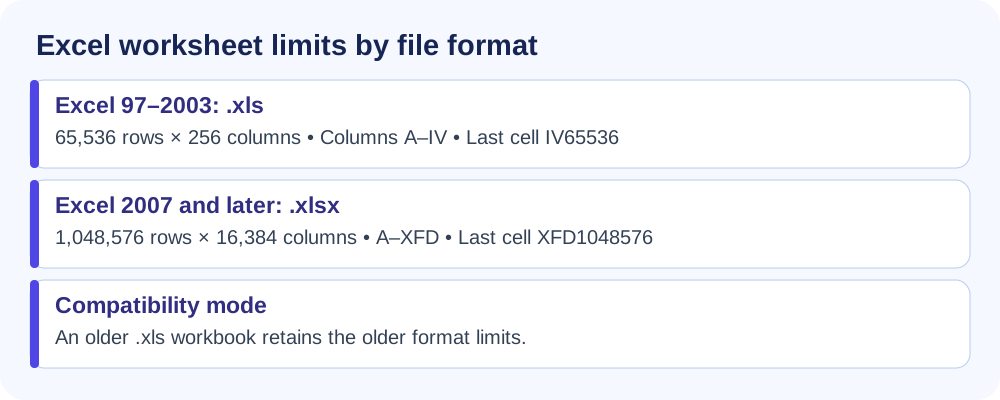
  • .xls — Default extension of Excel 98–2003.
  • .xlsx — Default extension of Excel 2007 and newer.
  • .xlsm — Excel workbook with macro support.
Rows and columns comparison graphic from the source PDF
Saving, Cells & Charts

Save Workbook

File → Save • Save button • Ctrl + S

Enter Data in Cell

Double-click cell • F2 • type on Formula Bar

Create Chart

1. Enter data → 2. Select cells → 3. Insert → Chart
Excel Function Categories

Character

UPPER • LOWER • TITLE

Arithmetic

SUM • AVG/AVERAGE • ROUND

Logical

IF

Date & Time

DATE • TIME • NOW
Character Functions
  • UPPER CASE: converts text to upper case — =UPPER("abc")ABC
  • LOWER CASE: converts text to lower case — =lower("ABC")abc
  • TITLE CASE: source gives =TITLE("JAMES BOND")James Bond
Arithmetic & Logical Functions
  • SUM: =SUM(A1:A10)
  • AVG / Average: =AVERAGE(A1:A10)
  • ROUND: =ROUND(10.789,2)10.79
  • IF: =IF(A1<A2,"True","false"); with A1=12, A2=30 → True
Date & Time Functions
  • DATE: =DATE(2015,11,6) → source result 11/6/2015.
  • TIME: =TIME(10,11,6) → source result 10:11AM.
  • NOW: =NOW() → source example 11/6/2015 10:11AM.
⚠ EXAM TRAP / SOURCE CAUTION
The supplied PDF explicitly writes TITLE() for title case and labels one category AVG while showing the syntax AVERAGE(). These are preserved exactly as source-derived content rather than silently reconciled with external Excel documentation.
MS PowerPoint — Introduction & History
  • MS PowerPoint is included in the Microsoft Office suite.
  • It is used to make presentations for personal and professional purposes.
  • The source says it was created at Forethought Inc. by Robert Gaskins and Dennis Austin.
  • It states a release date of 20 April 1987 and acquisition by Microsoft three months later.
  • The first Microsoft version listed is MS PowerPoint 2.0 (1990).
What is PPT? • Slide Layout • Insert

PPT

Presentation-based program using graphics and videos; source lists file extension .ppt.

Slide Layout

Multiple options and layouts are available under the Home tab.

Insert

Images, audio, video, header, footer, symbols, shapes, etc.
Main Features, Animations & Transitions
Design IdeasAnimationsSlide TransitionsImagesMerge ShapesVideosIconsPowerPoint Notes

Animation Types

Entrance • Emphasis • Exit • Motion Path

Common Transitions

Cut • Reveal • Shapes • Uncover • Wipe
PowerPoint Shortcut Keys
ShortcutFunction shown in source
Ctrl + ZUndo
Ctrl + YRedo
F5Start slide show
EscEnd slide show
Ctrl + PPrint
Ctrl + SSave
Ctrl + QClose PowerPoint
Ctrl + OOpen presentation
Ctrl + MNew slide
Page DownNext slide
Page UpPrevious slide
Ctrl + Shift + DDuplicate slide
Ctrl + +Zoom in
Ctrl + -Zoom out
Ctrl + Alt + OZoom to fit
Ctrl + XCut
Ctrl + CCopy
Ctrl + VPaste
Ctrl + DDuplicate object
Ctrl + Shift + CCopy formatting
Ctrl + Shift + VPaste formatting
Ctrl + Alt + VPaste Special
⚠ SOURCE NOTE
PowerPoint shortcut entries are reproduced from the supplied PDF, including the source's Ctrl + Alt + O = Zoom to fit entry.
Ultra-Fast Revision
TopicRemember
MS WordWord processor • Multi-Tool Word • 1983 • documents
Word ViewsPrint Layout • Full Screen Reading • Web Layout • Outline • Draft
ExcelElectronic worksheet / spreadsheet • rows + columns
CellBasic worksheet unit
WorkbookMultiple worksheets in one file
Excel Extensions.xls • .xlsx • .xlsm
Character FunctionsUPPER • LOWER • TITLE (as printed in source)
ArithmeticSUM • AVERAGE • ROUND
LogicalIF
Date & TimeDATE • TIME • NOW
PowerPointPresentation program • .ppt • slides
Animation TypesEntrance • Emphasis • Exit • Motion Path
⚡ ONE-LINE MEMORY
Word = Write • Excel = Calculate/Analyze • PowerPoint = Present
Chapter Boundary
Chapter 09 ends on PDF page 82 with PowerPoint editing shortcuts. The index lists the next chapter as Programming Language, printed pages 82–85.