Hardware
Tangible / physical components
Internal
Processor • Motherboard • RAM/ROM
External
Input • Output • Storage devices
IPOS
Input → Process → Output → Storage
🧩 Computer Hardware / कंप्यूटर हार्डवेयर
  • Computer hardware refers to the physical/tangible components of a computer system — the parts that can be touched.
  • Internal components: Processor, Motherboard, RAM/ROM.
  • External / peripheral devices: Input devices, Output devices and Storage devices.
  • Input device: lets the user enter information and issue commands.
  • Output device: displays information, creates printed copies or generates sound.
  • System unit: accepts and processes data brought in by input devices.
1. INPUTKeyboard, Mouse, OCR, OMR, MICR, Scanner, Joystick, Touch etc.
2. PROCESSORMicroprocessor • RAM/ROM • Motherboard
3. OUTPUTMonitor • Printer • Speaker • Plotter • Projector
4. STORAGEFloppy • HDD • Optical discs • Pen drive • Memory card etc.
SOURCE ORGANISATION
The PDF treats Memory & Storage as a subsection inside Chapter 5 Hardware, so this page keeps it within the same chapter.
Keyboard layout shown with the IPOS hardware section
PDF visual • Keyboard layout shown with the IPOS hardware section (page 20)
⌨ Input Devices / इनपुट डिवाइस

The source IPOS chart lists Mouse, Keyboard, OCR, BCR, OMR, MICR, Stylus, Scanner, Joystick, Webcam, Light Pen, Trackball, Touchpad, Biometrics, Microphone, Touchscreen, Barcode Reader and QR Reader as input devices.

Keyboard / कीबोर्ड

  • Used to enter text information into the computer.
  • Can also type commands that direct the computer to perform actions.
Keyboard
PDF visual • Keyboard (page 20)

Mouse / माउस

  • A pointing device that detects two-dimensional motion relative to its supporting surface.
  • A wireless mouse may communicate through radio waves, often using Bluetooth hardware/protocol.
  • Buttons and a possible scroll wheel allow interaction with the GUI.
Mouse and mouse-button visual
PDF visual • Mouse and mouse-button visual (page 21)

OCR — Optical Character Recognition

  • Also described as Optical Character Reader.
  • Recognises printed or handwritten alphanumeric characters by scanning a form.
  • The source mentions Intelligent Character Recognition (ICR) for interpreting image data, especially alphanumeric text.
OCR / handwriting recognition visual
PDF visual • OCR / handwriting recognition visual (page 21)

OMR — Optical Mark Recognition

  • Enables automatic processing of hundreds or thousands of documents per hour.
  • Popular in objective tests using cards/sheets containing response circles.
OMR sheet and reader
PDF visual • OMR sheet and reader (page 22)

MICR — Magnetic Ink Character Recognition

  • Character-recognition technology used mainly by the banking industry for processing and clearance of cheques/documents.
  • MICR line is at the bottom of cheques/vouchers and typically includes city code, bank code and branch code.
MICR cheque and reader
PDF visual • MICR cheque and reader (page 22)

Stylus / स्टाइलस

  • A long, stiff writing tool similar to a ballpoint pen.
  • On smartphones it is used to enter information or write on a touch screen.
Stylus devices
PDF visual • Stylus devices (page 22)

Scanner / स्कैनर

  • Captures images from photographic prints, posters, magazine pages and similar sources for computer editing/display.
  • Source lists hand-held, feed-in and flatbed types, for black-and-white or colour scanning.
Flatbed scanner
PDF visual • Flatbed scanner (page 23)

Joystick / जॉयस्टिक

  • Input device with a stick that pivots on a base.
  • Reports its angle or direction to the device it controls.
Joystick
PDF visual • Joystick (page 23)

Light Pen / लाइट पेन

  • Uses a light-sensitive detector to select objects on a display screen.
  • Similar to a mouse, but selection is made by directly pointing the pen at display objects.
Light pen / CAD-CAM visual
PDF visual • Light pen / CAD-CAM visual (page 24)

Touchpad / Track-pad

  • Pointing device with a tactile sensor surface that translates finger motion/position to a relative screen position.
  • Common on laptops and used as a mouse substitute when desk space is scarce.
Touchpad
PDF visual • Touchpad (page 24)

Biometrics / बॉयोमेट्रिक्स

  • Science and technology of measuring and analysing biological data.
  • Examples in the source: fingerprints, eye retinas/irises, voice patterns, facial patterns and hand measurements for authentication.
Biometric identification methods
PDF visual • Biometric identification methods (page 25)

Microphone / माइक्रोफोन

  • Audio input hardware peripheral; source credits Emile Berliner (1877).
  • Most microphones connect using the “mic” port on the computer sound card.

Touch Screen / टच स्क्रीन

  • Electronic visual display controlled by simple or multi-touch gestures using a stylus/pen and/or fingers.
  • Common in game consoles, all-in-one computers, tablet computers and smartphones.
Touch screen
PDF visual • Touch screen (page 25)

Barcode Reader / बार कोड रीडर

  • Also called a price scanner or point-of-sale (POS) scanner.
  • Hand-held or stationary input device used to capture/read information in a barcode.
Barcode and barcode reader
PDF visual • Barcode and barcode reader (page 26)

QR (Quick Response) Code Reader

  • Reads a machine-readable array of black-and-white squares.
  • Source notes QR codes are commonly used to store URLs or other information for reading by a smartphone camera.
QR code reader visual
PDF visual • QR code reader visual (page 26)
IPOS LIST REMINDER
BCR, Webcam and Trackball are present in the source input-device list even though this chapter does not give them separate explanatory paragraphs.

CPU — Central Processing Unit

  • Designed to perform arithmetic and logic operations using small number-holding areas called registers.
  • Typical microprocessor operations listed: adding, subtracting, comparing two numbers and fetching numbers from one area to another.
  • These operations result from a set of instructions that are part of the microprocessor design.
CPU block diagram and processor
PDF visual • CPU block diagram and processor (page 27)

Motherboard (Heart) / मदरबोर्ड

  • Physical arrangement in a computer containing its basic circuitry and components.
  • On a typical motherboard, circuitry is imprinted or affixed to the surface.
Motherboard diagram
PDF visual • Motherboard diagram (page 27)

Monitor / मॉनिटर

  • Displays video and graphics information generated by the computer through the video card.
  • Called VDU (Visual Display Unit); the source also lists VDT as Visual Display Terminal.
  • Monitor types in the source: CRT, LCD/TFT and LED.
Monitor types overview
PDF visual • Monitor types overview (page 27)

CRT — Cathode Ray Tube

  • Source explains a CRT as working by moving an electron beam back and forth across the back of the screen.
  • Image → Pixel → Picture Element → small dot/picture is noted in the source.
CRT monitor and CRT working visual
PDF visual • CRT monitor and CRT working visual (page 28)

LCD / TFT

  • LCD is described as a display used in digital watches and many portable computers.
  • Source says two sheets of polarizing material have a liquid-crystal solution between them.
  • TFT = Thin Film Transistor.
LCD monitor
PDF visual • LCD monitor (page 28)

LED — Light Emitting Diode

  • Source describes LED as a light-emitting diode product with better lifespan and electrical efficiency than incandescent lamps.
  • Its comparison table says LED monitor contrast and colour accuracy are better than LCD and power use is lower than LCD.
LED monitor
PDF visual • LED monitor (page 29)
LCD/TFT vs LED — Source Comparison
LCD/TFTLED
Contrast is not so goodContrast is better than LCD
Colour accuracy is less than LEDColour accuracy is better than LCD
Consumes less power than CRTConsumes less power than LCD
Source says LCD uses mercury and is harmful for environmentSource says LED does not use mercury and is environment-friendly

Projector / प्रोजेक्टर

  • Device designed to take an image from a video source and project it onto a screen or other surface.
Projector
PDF visual • Projector (page 33)

Speaker / स्पीकर

  • External multimedia speakers for a computer; source notes they often contain a low-power internal amplifier.
Computer speakers
PDF visual • Computer speakers (page 33)
🖨 Printer / प्रिंटर
  • A printer is an output device that converts soft copy into hard copy.
  • Impact printers: Daisy Wheel, Teletypewriter, Dot Matrix.
  • Non-impact printers: Laser, Inkjet, Thermal, 3-Dimensional printer, Plotter.
Impact PrinterNon-Impact Printer
Strikes paper directly while printingDoes not strike paper directly
Makes noise while printingDoes not make noise
Source calls impact printers economicSource calls non-impact printers costly

Daisy Wheel Printer

  • Impact-printer technology using interchangeable preformed type elements.
  • Source says it can generate high-quality output comparable to premium typewriters.
Daisy wheel printer
PDF visual • Daisy wheel printer (page 30)

Teletypewriter Printer

  • Device that sends a typed message to another place and has a typewriter keyboard plus a printer.
Teletypewriter printer
PDF visual • Teletypewriter printer (page 30)

Dot Matrix Printer

  • Uses a print head moving back-and-forth / up-and-down on the page.
  • Prints by impact, striking an inked ribbon against paper, similar to a typewriter mechanism.
Dot matrix printer
PDF visual • Dot matrix printer (page 31)

Laser Printer

  • Electrostatic digital machine producing high-quality text and graphics using a laser beam over a charged drum/image surface.
Laser printer and process visual
PDF visual • Laser printer and process visual (page 31)

Inkjet Printer

  • Creates a digital image by propelling ink onto paper, plastic or other substrates.
  • Source identifies it as a commonly used printer type.
Inkjet printer
PDF visual • Inkjet printer (page 31)

Thermal Printer

  • Direct thermal printing produces a printed image by selectively heating coated material as paper passes over the thermal print head.
Thermal printer
PDF visual • Thermal printer (page 32)

3-Dimensional Printer

  • 3D printing / additive manufacturing makes a three-dimensional solid object of virtually any shape from a digital model.
3D printer
PDF visual • 3D printer (page 32)

Plotter

  • Computer printer for vector graphics.
  • Source says plotters were used in applications such as computer-aided design and have generally been replaced by wide-format conventional printers.
Plotter
PDF visual • Plotter (page 32)
🧠 Computer Memory / कंप्यूटर मेमोरी
  • Memory is compared with the human brain and is used to store data and instructions.
  • The source divides memory by nature into Temporary / Volatile and Permanent / Non-Volatile.
Volatile memory visual
PDF visual • Volatile memory visual (page 34)
Non-volatile memory visual
PDF visual • Non-volatile memory visual (page 34)

Volatile Memory

  • Maintains data only while the device is powered on.
  • RAM is given as the example used for primary storage in personal computers.

Non-Volatile Memory

  • Can hold saved data even when power is turned off.
  • ROM is given as the example.

Cache Memory

  • Used by CPU to reduce average memory-access time.
  • Placed between main memory and CPU.
  • Temporary area for frequently accessed data.

RAM — Random Access Memory

  • Computer data storage that allows stored data to be accessed directly in random order.
  • The source identifies RAM as volatile memory.
RAM module
PDF visual • RAM module (page 35)

Static RAM (SRAM)

  • Called static because it continues to hold information without refreshment while powered.
  • The source says it does not require refreshment.

Dynamic RAM (DRAM)

  • Semiconductor memory commonly used for data/program code needed by a processor.
  • Its storage cell needs refreshing / a new electronic charge every few milliseconds to compensate for capacitor charge leakage.

SDRAM

  • Synchronous Dynamic Random Access Memory.
  • Uses the burst-mode concept to improve performance.

DDR SDRAM

  • Double Data Rate Synchronous Dynamic RAM.
  • Source describes it as similar to SDRAM but with higher bandwidth, meaning greater speed.

VRAM — Video RAM

  • Also described as multiport dynamic random access memory (MPDRAM).
  • Used specifically for video adapters or 3-D accelerators.

ROM — Read Only Memory

  • Non-volatile memory that stores BIOS instructions required to start the computer when power is first turned on.
ROM chip
PDF visual • ROM chip (page 36)

PROM / EPROM

  • PROM: can be programmed only once and is not erasable.
  • EPROM: can be erased by exposure to ultraviolet light and then rewritten; source also calls it Ultra Violet PROM.
⚡ Cache Memory
  • Used by the CPU to reduce average time needed to access memory.
  • Used between main memory and CPU.
  • Frequently accessed data can be stored there for rapid access.
💾 Secondary Storage / द्वितीयक भंडारण
  • Used to store data for backup purposes; source also calls it external/auxiliary, non-volatile backup memory.
  • Direct / Random access: hard drives, flash drives and almost all other storage devices in the source.
  • Sequential access: magnetic tape; it must be wound through to reach required data.

Magnetic Tape / चुंबकीय टेप

  • Plastic tape covered in a magnetic coating.
  • Based on sequential/serial access.
Magnetic tape
PDF visual • Magnetic tape (page 38)

Hard Disk / हार्ड डिस्क

  • Permanent / non-volatile storage device.
  • Stores and retrieves digital information using rapidly rotating media coated with magnetic material.
  • Source says data is read using a random-access method.
Hard disk
PDF visual • Hard disk (page 38)

Floppy Disk / Diskette

  • Removable magnetic storage medium.
  • 3.5 inch: 1.44 MB • 5.25 inch: 1.2 MB • 8 inch: 768 KB.
Floppy disks
PDF visual • Floppy disks (page 39)

Zip Disc

  • Described as a large, chunky floppy-like disc with hard plastic outer casing and a magnetic disc inside.
  • Source capacity: up to 750 MB.
Zip discs
PDF visual • Zip discs (page 39)

USB HDD

  • Disk enclosure designed to hold/power disk drives and provide a mechanism for communication with one or more computers.
USB hard-disk enclosure
PDF visual • USB hard-disk enclosure (page 39)

Optical Disc / ODD

  • Optical disc drive (ODD) uses light / electromagnetic waves near the light spectrum as part of reading or writing data.
  • The source groups CD, DVD and Blu-ray under optical storage.
Optical discs
PDF visual • Optical discs (page 40)

Compact Disc (CD)

  • Optical medium written/read using laser.
  • Source capacity: about 700 MB.
  • CD-R: write once, read many (WORM). CD-RW: data can be overwritten.
CD-R 700 MB
PDF visual • CD-R 700 MB (page 40)

DVD — Digital Versatile Disc

  • Optical disc like CD but with much higher capacity.
  • Standard DVD source capacity: about 4.7 GB.
  • Can be writable or rewritable.
DVD
PDF visual • DVD (page 41)

Blu-ray Disc (BRD)

  • High-density optical-disc format similar to DVD.
  • Source capacity: 50 GB to 100 GB.
Blu-ray disc
PDF visual • Blu-ray disc (page 41)

HVD — Holographic Versatile Disc

  • Optical-disc technology.
  • Source capacity: 6 TB.
Holographic Versatile Disc
PDF visual • Holographic Versatile Disc (page 42)

Flash Memory / Pen Drive

  • Electronic non-volatile storage medium that can be erased and reprogrammed.
  • Pen drive is portable flash memory used to store data permanently.
Pen drive
PDF visual • Pen drive (page 42)

Memory Card

  • Non-volatile data storage.
  • Commonly used in devices such as digital cameras, mobile phones, laptop computers, MP3 players and video game consoles.
Memory card
PDF visual • Memory card (page 43)

Disk Structure — Track & Sector

  • Disk is divided into concentric circles called tracks.
  • The source describes multiple blocks within a track as sectors.
Disk tracks and sectors
PDF visual • Disk tracks and sectors (page 43)

Virtual Memory

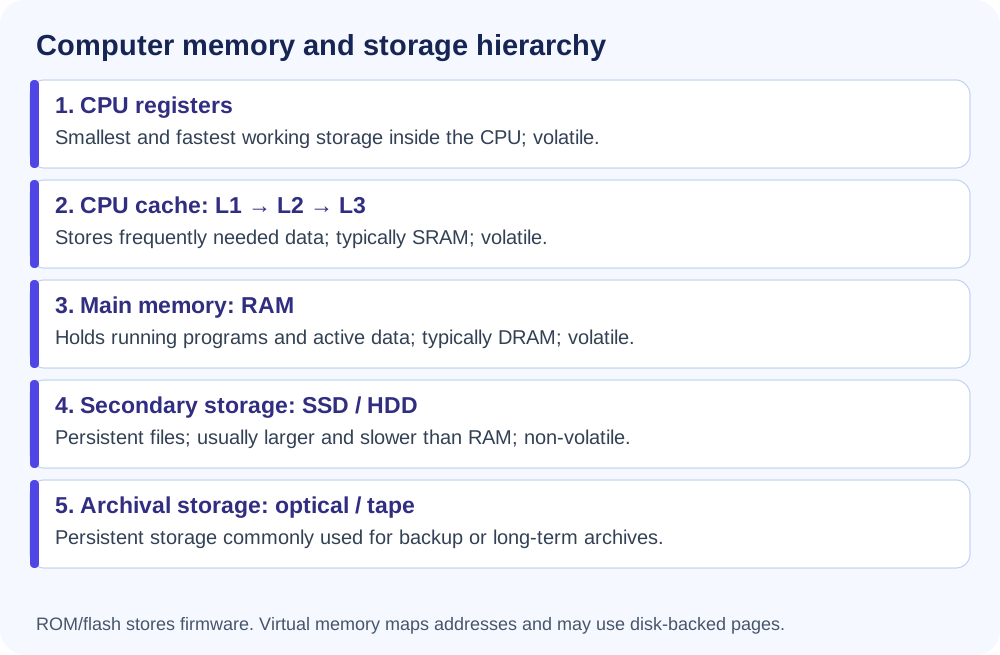
  • Combines RAM with temporary space on the hard disk.
  • When RAM runs low, data is moved to a paging file; this frees RAM so work can continue.
  • The source also calls it Extended RAM.
Memory Unit & HDD File Systems
  • Memory unit is used to measure memory capacity.
  • Smallest memory unit in the source: Bit (binary digit).
FAT (File Allocation System/Table)NTFS (New Technology File System)
Source: not secureSource: secure
Does not support disk quotaSupports disk quota
Does not support data compressionSupports data compression
Memory hierarchy
PDF visual • Memory hierarchy (page 44)
⚡ Quick Recall — Hardware
  • Hardware: tangible / physical computer components.
  • IPOS: Input → Processor → Output → Storage.
  • OCR: printed/handwritten character recognition; OMR: mark recognition; MICR: cheque/document character recognition used in banking.
  • CPU: arithmetic + logic operations; uses registers.
  • Motherboard: source labels it “Heart”.
  • Monitor types: CRT • LCD/TFT • LED.
  • Impact printers: Daisy Wheel • Teletypewriter • Dot Matrix.
  • Non-impact printers: Laser • Inkjet • Thermal • 3D • Plotter.
  • Volatile: RAM • Non-volatile: ROM.
  • Cache: between main memory and CPU; frequently used data for fast access.
  • Direct access: HDD/flash etc. • Sequential: magnetic tape.
Floppy 3.5″1.44 MB
Zip Disc750 MB
CD~700 MB
DVD~4.7 GB
Blu-ray50–100 GB
HVD6 TB
Smallest UnitBit
Virtual MemoryRAM + HDD temporary space
SOURCE NOTE
This mind map is built from the PDF chapter itself. Where the PDF uses unusual wording or labels, the source framing is retained rather than silently replaced with outside material.